
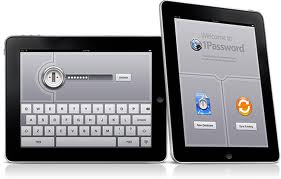
 1Password is a very secure way to keep and maintain all your passwords in one location. 1Password is a very nicely laid out application and easy to use interface. You can add information with ease such as usernames, passwords for different accounts, identities, notes, software, and much more. 1Password has a very easy way of allowing the user to add sensitive financial material. Such things as credit cards and bank information can be added with great assurance of security. It allows different logins and usernames for different websites you may need. It’s simple to login using Password1 for sites such as eBay or Amazon you don’t have to worry about forgetting that long hard to remember password. If the application is left open or unattended it will automatically lock itself after a set amount of time. I really like that option for this application. There’s been many times when I have received a phone call or been distracted from the computer or iPad and have walked off from it, leaving it accessible to anyone in the room.

1Password
The most important feature for this type of application is security. That will be the primary concern of each user. I can assure you this has been well covered by the developer of this app. Security has been an issue since the internet began. That’s the reason for you reading this review. Most websites that need a password and username are becoming more demand today. This app makes remembering all the different passwords simple and secure. If you need to backup your passwords to dropbox or any other way it’s encrypted. This means if the material is obtained by anyone other than the creator it’s useless. It will look like a bunch of numbers or shapes depending how it was encrypted.
Pros:
• Simple to Use
• Great tutorials
• Security
• Easy to save information
• Easily backup and restore
1Password
Cons:
• Price
• Doesn’t work in all Windows browsers(at this time)
This application is a one-stop shop or using any type of username and password combinations It will securely and adequately store all username and password while allowing you, the user to keep your sanity. You will no longer have to keep a record of all your passwords on your desk while surfing the internet. I would strongly suggest this application to anymore and everyone needing to remember username and passwords or any sensitive financial account information. I think that will include about everyone walking his planet.
Thank you,
Mitch Stevens
www.iPhoneCaptain.com
Leave a Reply